Modern AI tools are getting more powerful every day, yet their inner workings often remain a mystery to us users. What actually happens the moment you hand a complex, multi‑step task over to Perplexity? How does it decide what it can do and where its limits lie?
I ran into a striking example while tinkering with one of these systems. It flawlessly parsed a website’s structure and automatically gathered every link into a single JSON file—a job that requires both network access and data analysis. But when I asked it to process each link individually, Perplexity politely replied: “Sorry, but this exceeds resource limits.”

This refusal made me wonder: what exactly are these limits? Which resources—CPU time, memory, network requests—have been exhausted? What’s really going on “under the hood” of these smart assistants?
First Steps: Inspect Your Own Logs
When an AI cites internal constraints, the first instinct is to uncover their nature. But how can you do that when you’re essentially inside a black box with no access to system metrics?
The answer was surprisingly simple: ask the AI to analyze its own logs and environment.
I wrote a quick Python script to gather basic system info and asked Perplexity to run it, then return the output:
import psutil, platform, os
from datetime import datetime

def is_running_in_docker():
    """Check if running inside Docker"""
    if os.path.exists('/.dockerenv'):
        return True
    try:
        with open('/proc/1/cgroup', 'r') as f:
            return 'docker' in f.read()
    except:
        return False

print(f"System: {platform.system()} {platform.release()}")
print(f"Docker: {is_running_in_docker()}")
print(f"CPU: {psutil.cpu_count()} cores")
print(f"RAM: {psutil.virtual_memory().total / 1e9:.1f} GB")
The first results were intriguing. The script reported that it was running on Linux (kernel 6.1), inside a Docker container. It had access to 2 CPU cores and roughly 1 GB of RAM. Subsequent tests suggested the RAM limits were likely artificial and didn’t reflect real constraints.
It became clear that the system grants full super‑user rights inside a transient container that exists only while a user’s task is running. The container ID matched between the application and my browser session.
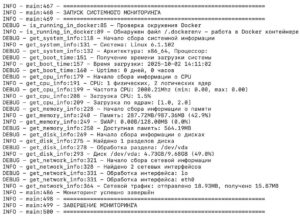
But that was just the tip of the iceberg. Beneath the surface lay a far more sophisticated architecture than a simple virtual machine.
Technical Analysis: Unpacking the Architecture
Diving deeper, I discovered that by default a FastAPI web server runs on port 49999 inside the container. That was the key to understanding the whole system. Examining its OpenAPI spec revealed the full picture through its API endpoints:
- GET /health – health check.
- POST /execute – main endpoint for code execution.
- GET/POST /contexts – session (context) management.
- POST /contexts/{id}/restart – restart a specific session.
- DELETE /contexts/{id} – delete a session after completion.
This architecture solves the core problem of all AI systems: safe execution of arbitrary code. Traditional approaches either severely limit functionality (as in early ChatGPT) or introduce serious security risks. Here, the chosen path is the most advanced—full isolation via lightweight containers.

The benefits are clear: maximum flexibility for running any code, security through isolation of each request, easy scalability (containers spin up and down on demand), and high performance thanks to WebSocket for low‑latency data exchange.
Further process inspection with psutil revealed that this isn’t just a single container but an ecosystem of services:
- FastAPI server acts as the API gateway.
- Jupyter Server is the core that actually runs code.
- SSH server provides administrative access for debugging.
- Multiple
socatprocesses serve as network bridges, proxying internal services outward.
The final architecture looks like a chain: FastAPI ↔ WebSocket ↔ Jupyter Kernel. In essence, it’s a Remote Code Execution Service tailored for AI agents. FastAPI is chosen for speed and auto‑documentation; Jupyter Kernel offers a battle‑tested, secure execution environment; WebSocket provides the interactive low‑latency channel.
The system is also extremely performance‑optimised: it uses uvloop, orjson, and httptools—all top‑tier components for speed with minimal overhead.
Infrastructure Analysis: What Does It Cost?
Network routing analysis shows that the physical infrastructure sits in a Google Cloud Platform data center in Oregon, USA. The average latency to Moscow is about 170–200 ms. This turns out to be the commercial E2B Sandbox platform—a specialized solution for running AI agents in isolated cloud “sandboxes.”
Given Perplexity’s scale—over 780 million requests per month according to public data—it’s reasonable to estimate that enterprise‑grade infrastructure costs between $10,000 and $50,000 a month.
It’s fascinating that other industry giants adopted the same architectural approach. GitHub Copilot, Replit, CodeSandbox, Google Colab all use similar container isolation techniques. This has become an de‑facto industry standard because it strikes the optimal balance between security, performance, and flexibility. At this scale, every millisecond saved translates into significant cost savings.
Perplexity chose this path because its users tackle a wide range of tasks—from data analysis to web scraping to automated code testing. Traditional limits like those in ChatGPT’s Code Interpreter are inadequate for research scenarios where the AI needs access to any library or tool. Container isolation is the ideal compromise.
Practical Takeaways: Know Your Tool
This investigation clearly shows that modern AI systems aren’t just “smart chatbots”; they’re complex production environments with meticulously engineered architecture. Behind Perplexity’s friendly interface lies:
- A enterprise‑grade infrastructure where every component is optimised.
Leave a Reply